

restic-monitor: Never Miss a Failed Backup
I run restic to back up my servers. One day I noticed a repository hadn’t received a new snapshot in weeks. The backup job had been silently failing, and I had no idea.
That’s the worst kind of failure: everything appears fine until you actually need the backup.
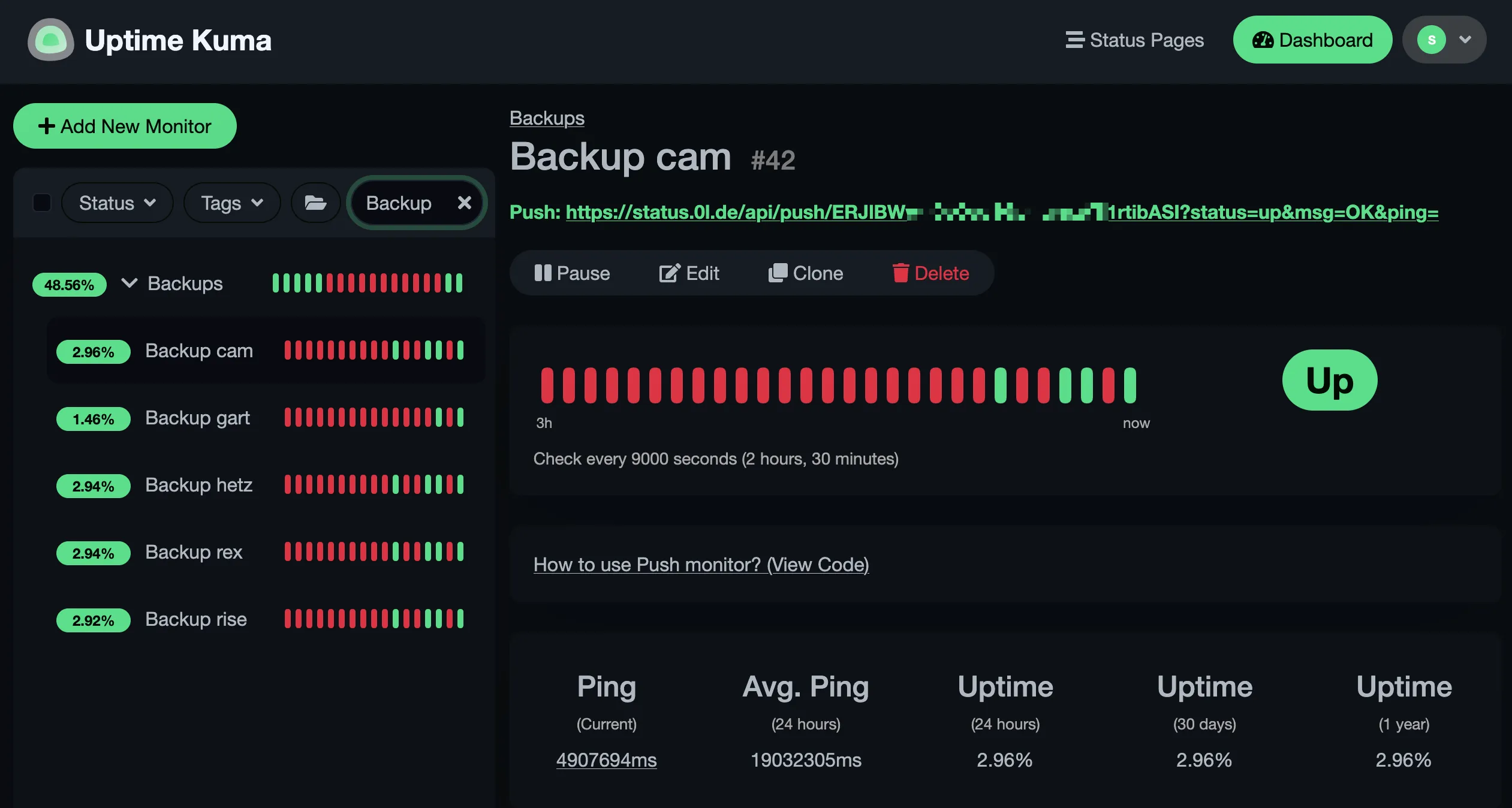
/stv0g/restic-monitor is a small Go tool that checks whether each of your restic repositories has a recent enough snapshot and reports the result to an Uptime Kuma push monitor. Run it on a timer and you’ll know within hours if a backup stops working.
The Problem with Silent Failures
Section titled “The Problem with Silent Failures”Backup tools are generally good at telling you when a backup starts failing. What they don’t do is tell you when the backup job itself stops running — cron exits silently, a service gets disabled after an update, a mount point disappears or the machine is simply not running. The backup appears to exist; it just hasn’t been updated in days.
Uptime Kuma’s push monitors flip this around: your service sends a heartbeat on each successful run, and if it stops arriving, the monitor alerts you. restic-monitor sends that heartbeat.
Configuration
Section titled “Configuration”The tool reads a YAML config file listing your repositories and how fresh their snapshots should be.
defaults:  url: "s3:https://s3.example.com/restic-{{ .Name }}"  max_age: 1d  push_url: https://uptime-kuma.example.com/api/push/  extra_env:    AWS_ACCESS_KEY_ID: "your-key-id"    AWS_SECRET_ACCESS_KEY: "your-secret"
repositories:  web-server:    push_token: yDaQM5YUuS3rczSvLsOucs4LqHSRDhu6
  db-server:    push_token: ap2F52Qjmup9dxyPcWa1eNt125AukcrV    max_age: 6h
The defaults section reduces repetition — including Go template syntax in url, where {{ .Name }} expands to the repository key.
Each repository gets its own push token and max_age.
Read-Only Access Is Enough
Section titled “Read-Only Access Is Enough”restic-monitor only needs to read your repositories — it never writes, prunes, or modifies anything. For S3-backed repos the monitoring credentials can be a dedicated IAM user with a minimal policy:
{ "Effect": "Allow", "Action": ["s3:GetObject", "s3:ListBucket"], "Resource": ["arn:aws:s3:::your-bucket", "arn:aws:s3:::your-bucket/*"]}Fast Mode — No Encryption Key Required
Section titled “Fast Mode — No Encryption Key Required”The default mode calls restic snapshots, which needs the repository password to decrypt the index.
Setting RESTIC_MONITOR_FAST=true drops that requirement for S3-backed repositories: instead of invoking restic, it lists objects under snapshots/ directly via the S3 API and uses the object’s last-modified time as a proxy.
Only s3:GetObject and s3:ListBucket are needed — no password, and a compromised monitoring host cannot decrypt your backup data.
For non-S3 backends it falls back to the normal restic path automatically.
Independent Auditing
Section titled “Independent Auditing”
Because restic-monitor only needs read access, it can run on a completely separate machine — not the server being backed up, and not the machine hosting the backup storage. If the backup machine also runs the health check, a full system failure silences both at once. A third machine makes it a genuine independent audit.
In practice I run restic-monitor on my home server, checking repositories on an object storage provider for data originating on my VPS — three independent failure domains, one status dashboard.
Not a Substitute for Restore Drills
Section titled “Not a Substitute for Restore Drills”restic-monitor can tell you that snapshots exist and are recent. It cannot tell you whether they are actually recoverable — corrupted or missing data, missing pack files, or a version mismatch all produce valid-looking snapshots that fail at restore time.
Use restic check for integrity verification and periodically do a real restore.
Neither is automated here; schedule them separately and actually run them.
NixOS Module
Section titled “NixOS Module”The flake ships a ready-made NixOS module that creates a dedicated system user, a oneshot service, and a timer.
{  inputs = {    nixpkgs.url = "github:NixOS/nixpkgs/nixos-unstable";    restic-monitor.url = "git+https://codeberg.org/stv0g/restic-monitor";  };
  outputs = { nixpkgs, restic-monitor, ... }: {    nixosConfigurations.my-host = nixpkgs.lib.nixosSystem {      system = "x86_64-linux";      modules = [        restic-monitor.nixosModules.default        {          nixpkgs.overlays = [ restic-monitor.overlays.default ];
          services.restic-monitor = {            enable = true;            interval = "*-*-* 06,18:00:00";
            # loaded via systemd LoadCredential into a private tmpfs            environmentFile = "/run/secrets/restic-monitor-env";
            settings = {              defaults = {                url = "s3:https://s3.example.com/restic-{{ .Name }}";                push_url = "https://uptime-kuma.example.com/api/push/";              };              repositories = {                web-server.push_token = "yDaQM5YUuS3rczSvLsOucs4LqHSRDhu6";                db-server = { push_token = "ap2F52Qjmup9dxyPcWa1eNt125AukcrV"; max_age = "6h"; };              };            };          };        }      ];    };  };}
The environmentFile is loaded via LoadCredential so the credentials file on disk only needs to be readable by root — the secrets are exposed to the service through a private tmpfs, not a plain environment variable visible in systemctl show.
- /stv0g/restic-monitor — source code and documentation
- Uptime Kuma — open source monitoring with push monitors
- restic — fast, secure, efficient backup program
If you find this useful, consider sponsoring on Liberapay.